
AI In Options Trading: Could It Change The Way You Trade?
You still have work to do. You need to build a strategy, test whether it has an edge, and decide how much you’re willing to risk on each trade. AI can speed up testing. You decide whether the results justify risking real money and when to step in if the system behaves differently than expected or market conditions change.
In this article, we’ll look at how much AI can change the way you trade options, from building and backtesting your strategy to executing trades, and what the limitations of using it are.
AI in financial markets: from institutional trading desks to individual traders
Large financial institutions were using automated trading systems long before today’s AI tools. As the SEC’s report on algorithmic trading explains, firms used software to analyze large amounts of market data and automate parts of execution.
Research and backtesting: Quantitative teams use historical data to test trading rules before putting capital at risk. Machine learning opened up other applications. In 2018, the researchers behind Deep Hedging explored how a model could adjust a derivatives hedge while accounting for trading costs and liquidity.
Fast execution: Some high-frequency trading firms use direct market data feeds and locate their servers close to exchange systems. That shortens the time between receiving a quote and reacting to it. Automated execution can follow programmed rules alone.
Today, individual traders can use AI for parts of that work. How far they can take it depends on three things.
AI model: Models differ in how well they follow complex trading rules, write and debug code, and how much data they can review at once. For years of options quotes, you can ask AI to write a script that processes the dataset.
Data access: AI can help write a backtest. Testing an options strategy requires historical quotes for the strikes and expirations the strategy would have traded.
Broker access: You can automate alerts or prepare trades for manual review. To submit live orders automatically, your system needs a compatible broker connection and rules that define when it can act.
For example, you might want to know what happens to call prices after a stock breaks out. AI can help you write a script that matches years of breakout signals to the historical options quotes available at the time. You can then compare how calls with different strikes and expirations performed over the next few trading days, without looking up every contract by hand.
Integrate AI into your trading system
You may come from a background in finance or investing and want to automate a trading strategy without knowing how to code. A few years ago, building an automated trading system often meant hiring a team of developers, explaining how you trade, and spending considerable time and money building and testing the software.
Today, you can describe your trading rules in plain English and ask a model such as GPT‑6 Sol in ChatGPT or Claude Fable 5.2 to draft a script. This approach is often called vibe coding. Compare the generated code with your rules, then test a few trades you can verify by hand.
For more complex work, such as debugging a backtest that pulls quotes for both legs of an options spread, you can use OpenAI Codex or Anthropic’s Claude Code. These tools can work across multiple files and run tests. Ask them to show which tests they ran and check whether the results match what you expected.
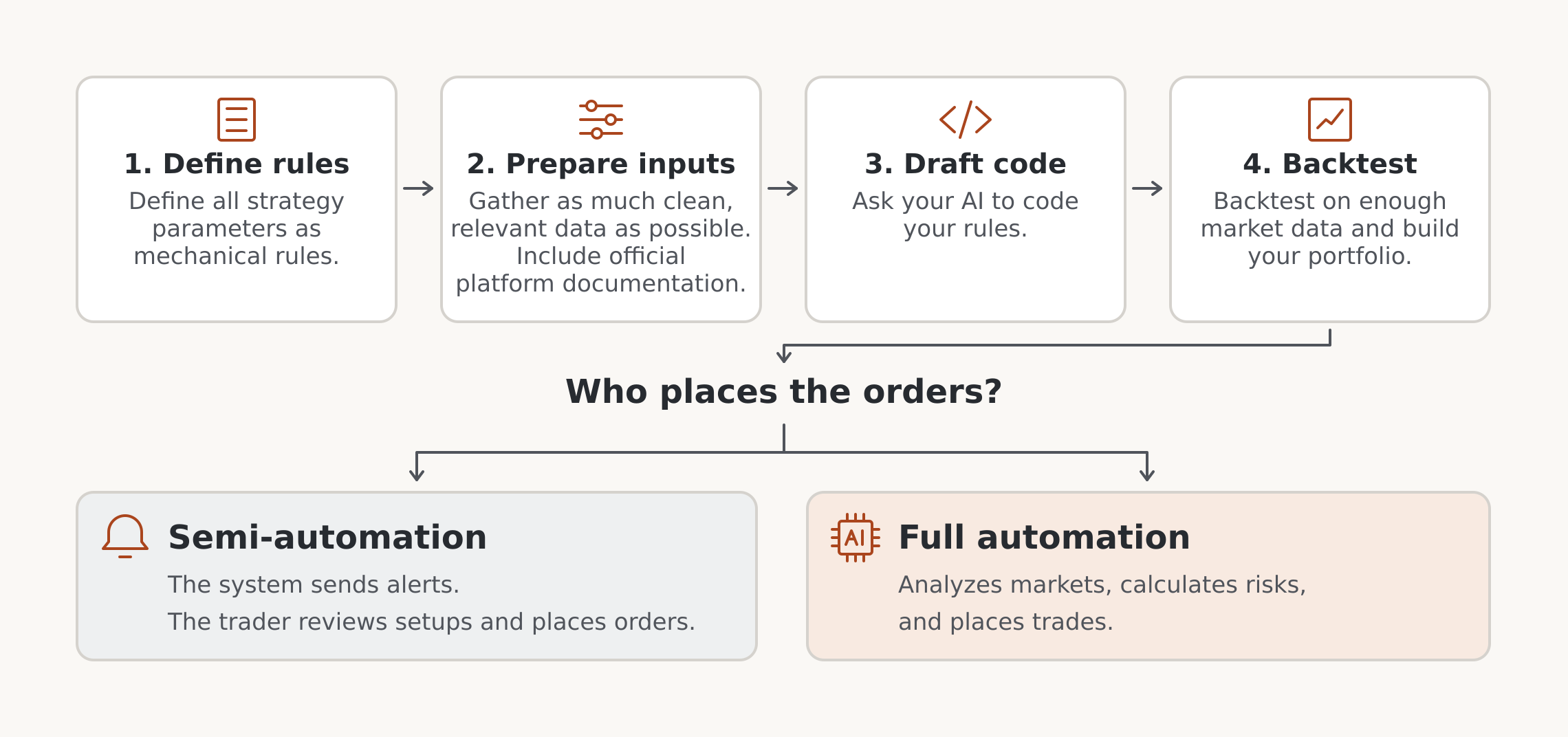
Here’s how you can use these AI tools in your trading workflow:
Turn your trading decisions into rules
Whether you trade trend following, mean reversion, or any other strategy, start with the decisions you want the system to make. Write down what triggers a trade, what you’ll trade, how much you’ll risk, and when you’ll exit or skip a setup. Include the indicators and analysis you already use, and spell out what you look for in each. If you want the system to place orders, define how it should handle those too.
Suppose you want to buy a bull call spread after a stock breaks out. You buy one call and sell another at a higher strike, both with the same expiration. Here’s how you could turn that setup into rules.
Signal: The stock must close above the highest price it reached in the previous 20 trading sessions.
Entry: At 9:45 a.m. Eastern the next trading day, select the expiration closest to 30 days away, within a 25- to 35-day window. Buy the call with the strike nearest the stock price and sell the call with a strike $5 higher. Skip the setup if no expiration qualifies or either strike is unavailable.
Risk: Set a maximum net debit of $1.25 per share and a dollar risk budget per trade. Use that budget to decide how many spreads you can open. Skip the trade if even one spread would exceed the budget.
Exit: Attempt to close both legs together at 9:45 a.m. Eastern five trading sessions after entry. Decide in advance what the system should do if the closing order goes unfilled.
Some decisions are harder to put into code. You might take profits when a move “looks tired,” based on what you’ve seen in similar trades. With partial automation, the system can alert you while you decide when to exit. If you want it to manage the exit too, describe what you see when momentum fades in terms the code can check, then test that rule.
When you automate a strategy, you may give up some of the flexibility you had trading manually. A fixed exit can leave money on the table when you would have held a winning trade longer. It can also give back some gains when you would have spotted fading momentum and taken profits sooner.
What you gain is a system that follows the same rules every time, cuts down on impulsive decisions driven by fear, greed, or FOMO, and frees you from having to watch every position. Judge the strategy over a series of trades. Look at whether it can produce a profit after costs, whether you can tolerate its drawdowns, and how much of your time it actually saves.
Building your own options strategy? See how professional options traders plan and manage their trades. Explore SteadyOptions membership for options education and real-time trade alerts, with explanations of why the team enters, adjusts, and exits trades.
Give AI the platform documentation and the right data
Once your rules are written down, tell the AI where the code will run. Share the official documentation for your platform’s scripting language or your broker’s API, or ask the AI to find the pages relevant to what you’re building. Ask it to show where the code handles each rule so you can check how it translated your instructions.
Give the AI a sample of your data so it can see how prices and timestamps are recorded. For the backtest itself, use as much clean, relevant history as you can get. In the breakout example, the stock’s price history tells you when the signal occurred. To estimate what it would have cost to open and close the spread, you need timestamped bid and ask quotes for both calls at the times specified in your rules. Cboe’s historical options quote data is one example.
Ask the AI to write the code that matches the stock signal to the two option contracts and their quotes. Decide how old a quote can be before the script treats it as stale. If either leg has a missing or stale quote, have the script flag the setup for review. Give the AI two examples with known outcomes. In the first, the order fills at $1.25 or less. In the second, it remains unfilled because the backtest’s fill rules never show a fill at $1.25 or less while the order is open.
From backtest to live trading
Check individual trades before judging the results
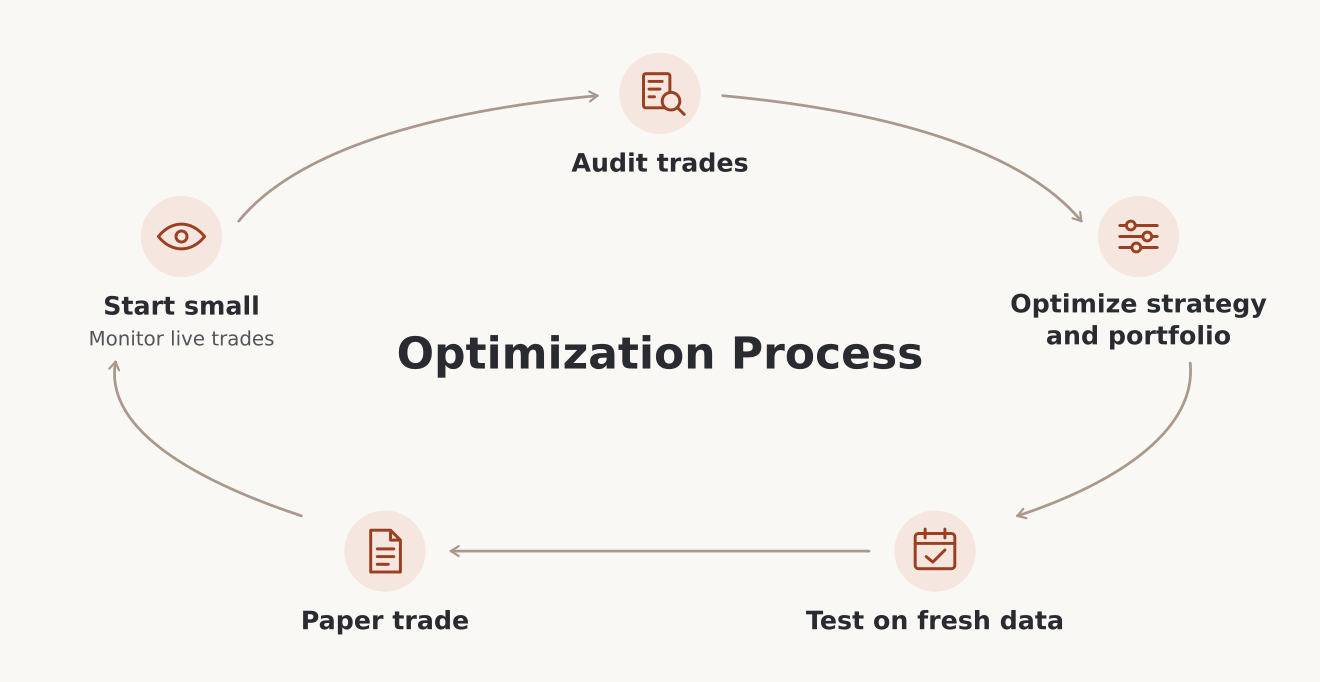
Open a few trades from the backtest and follow them from signal to exit. Did the code wait until the next session? Did it pick the right strikes and expiration? Did it respect the debit limit and attempt to close the spread at the right time?
If a trade looks wrong, give AI the timestamp, the rule, the expected result, and what the code actually did. Rerun that case after the fix. Once the script follows your rules, you can start evaluating the strategy itself.
Check whether the spread could have filled
Suppose the stock breaks out and your entry rules select the 100 call to buy and the 105 call to sell. Here’s what their quotes might look like at the scheduled entry time.
The midpoint of the call you buy is $2.20. The midpoint of the call you sell is $1.00. Subtract one from the other and you get a $1.20 net debit per share.
Buying at the displayed ask and selling at the displayed bid gives a $1.35 debit, above your $1.25 limit. A combined order could still fill at $1.25 or less. The midpoint alone gives you too little information to count it as a fill. If the order remains open, apply your fill rules to the quotes that follow.
That’s why the timestamp matters. In The Last 14 Minutes, SteadyOptions shows how a wide quote on one leg changed the calculated midpoint of a spread near the close.
Once you’ve checked that the trades and fills follow your rules, review three numbers first.
Net return: How much did the strategy earn after commissions and fees?
Trade count: How many trades contributed to those results?
Maximum drawdown: How far did the account fall from a peak before recovering or reaching the end of the test?
If you use a profit target and a stop, compare the planned reward with the amount at risk. This spread has a five-session exit and no fixed profit target, so look at the win rate alongside the average win and average loss after costs.
If you trade across several stocks, test the positions together. Two spreads on stocks in the same sector can lose money at the same time.
Set risk limits for each trade and for all open positions combined.
Compare portfolio versions over the same period using net return, maximum drawdown, and the Sharpe ratio. Sharpe measures how much return you earned above the risk-free rate relative to how much your returns fluctuated.
Test across market conditions that matter to your strategy. Set aside a later period before you adjust the rules, then use it once you’ve settled on a version. If you change the rules after seeing those results, use fresh data for the next independent check.
Connect alerts to execution and test it on paper
With semi-automation, a TradingView alert tells you when a breakout triggers. You can then check the spread’s price in your broker’s options chain and place the order yourself.
TradingView can simulate Pine strategy orders. For live automation, a TradingView webhook sends the signal to an external service. At your scheduled entry time, the service checks quotes and risk limits, then submits the order through the broker’s API if those checks pass.
Check that your broker supports placing both legs as a single order at a net limit price. Interactive Brokers supports spread orders through its Web API. Its paper simulator uses the best displayed quotes and has limited support for combo orders.
A backtest applies your rules to historical data. Paper trading lets you watch the system respond as signals arrive. Check how it handles:
A rejected entry order.
An unfilled exit order.
A submission timeout. Check whether the broker received or filled the order before retrying.
Start small and monitor what actually happens
If you go live, start with a position size whose loss you can absorb. Check the first trades against your rules. If the chart and broker use different feeds, compare the symbol, session settings, timestamps, and prices before deciding why a signal or fill differed from the test.
Keep a log of signals, submitted limits, actual fills, commissions, and orders that went unfilled. If far fewer orders fill within your $1.25 limit than the backtest assumed, pause new entries and see whether the quotes widened or your fill model was too optimistic.
Have a plan for open positions too. If a closing order remains unfilled as expiration approaches, decide how you’ll handle the spread and the risk of assignment on the short call. With American-style equity options, the short call can be assigned before expiration, especially just before the stock’s ex-dividend date. As market conditions change, review your rules and test any revisions before putting them into live use.
Advantages and disadvantages of AI in trading
AI can shorten the work between having an idea and seeing how it behaves in a test. The value depends on the job you give it and how easily you can check the result.
Final thoughts
AI is changing how traders and investors develop and test their strategies. You can use it to turn a trading idea into code, backtest your rules on years of historical data, and automate some or all of your trading process. Your experience still matters when you set the rules, decide how much to risk, and judge whether the results hold up.
Start with one task you can check yourself. Compare two spreads, test a single entry rule, or automate an alert. Give the system more responsibility once you’ve seen how it handles the job and what happens when something goes wrong.
Explore SteadyOptions membership for options education, trade ideas, and a community where you can see how traders plan entries, manage positions, and make exit decisions.
FAQ
Can I use AI for options trading without knowing how to code?
Yes. You can use an AI assistant to compare contracts, organize a trade plan, or draft a script from rules you describe. If the script will submit orders, you need a way to check its behavior and troubleshoot problems before it handles real money.
How can I compare two AI tools for options trading?
Give both tools the same options chain and the same task. For example, ask each to identify which bull call spreads meet your strike, expiration, and debit rules. Check whether each tool picks the right contracts, shows its calculations, and flags missing quotes.
Can AI help me review an options trade I already closed?
Yes. Give it your original trade plan, both legs’ entry and exit fills, and the reason you closed the position. Ask it to point out where your execution differed from the plan. For example, it can help you spot that you paid more for the spread than you intended or closed it before your exit rule called for it.
About the author: Naoufal Seddik is a trader and financial writer with over six years of experience in financial markets. He covers forex, indices, stocks, and commodities. He works with the editorial team to create clear, accurate trading and investing content for readers of all experience levels. He is also a Top Rated Plus freelancer on Upwork.
Upwork profile:
https://www.upwork.com/freelancers/~01900fde01a206f244